
CubeSmart Self Storage
CubeSmart, L.P.Business
3.3521.00 Reviews
- Version
- 3.2.7
- Installs
- 100.00K
- Age Rating
- Everyone
Screenshots
Our Review of CubeSmart Self Storage
 Analysis by Appyee
Managing a storage unit is usually something I want to finish quickly, not turn into another errand with paperwork, phone calls, and repeated trips to a desk. CubeSmart Self Storage is built around that practical need. It is a free business app from CubeSmart, L.P. that puts space management on a phone, with a straightforward focus rather than a broad collection of unrelated tools. After spending time with it, I see the main appeal clearly: when your storage details are already connected to your CubeSmart account and your phone has a reliable connection, routine tasks feel more approachable.
That convenience also comes with an important condition. This is a connected service, so the quality of the experience depends partly on the network around you and on the account information being available when you need it. I would recommend it to existing CubeSmart customers who want a mobile way to stay on top of their storage arrangements. I would not treat it as a replacement for every in-person or support interaction, especially when something urgent goes wrong.
How the app feels when storage management depends on a connection
The first thing I noticed is that the app makes most sense as an extension of an existing storage relationship. It is not a general business organizer, a file manager, or a marketplace for comparing storage companies. Its purpose is narrower: help customers manage their space through a mobile interface. That narrow focus is a strength because I am not forced to sort through features that have nothing to do with my unit.
At the same time, a narrow app can feel limited if you expect it to solve every problem connected with moving or storing belongings. It does not replace planning a move, arranging transport, labeling boxes, or keeping a separate inventory of what is inside the unit. I found it more useful as a control point for the storage account than as a complete storage-planning system.
Because the app works with account-related information, connectivity matters at several points. Opening a screen, refreshing details, or completing an account action may require the app to communicate with CubeSmart’s service. On a strong home connection or dependable mobile data, that relationship is easy to overlook. In a basement, parking structure, rural road, or crowded facility, it becomes much more noticeable.
This is the kind of app I would check before leaving home rather than assume it will always be ready at the exact moment I reach a unit. That small change in habit makes a difference. If I know I will need account information during a visit, I prefer to open the app beforehand, confirm that the relevant details load, and avoid relying on a weak signal at the property.
A realistic example is a weekend move. I might be carrying boxes in a borrowed vehicle, arrive at the facility, and realize I need to confirm something about my space. If the phone is connected, the app can be much more convenient than searching through email or trying to remember which details belong to which unit. If the connection is poor, however, the same moment can turn into a delay. The app reduces friction when prepared for, but it should not encourage me to leave all important information until the last minute.
Why the mobile setting is useful
Storage is an unusually mobile activity. I am often using the service while traveling between home, work, a moving truck, and the facility itself. A phone-based account is better suited to that pattern than a desktop-only portal because I do not have to return to a computer just to check the service I am using on the road.
The app is also a better fit for people who manage storage in short bursts. I may only need it around a move, a seasonal change, or a visit to retrieve something. That means the interface needs to be understandable even when I have not opened it for weeks. I prefer this kind of focused design to an app that assumes I will use it every day.
Still, mobile convenience has practical limits. A phone screen is not ideal for organizing a large household inventory, comparing many records, or planning a complicated relocation. For those jobs, I would use a spreadsheet, notes app, or moving checklist alongside CubeSmart Self Storage. The storage app can serve as the account-specific piece while other tools handle the broader project.
One useful habit is to separate “account actions” from “move planning.” I would use the CubeSmart app for the former and keep a simple written list for the latter. That list might include box numbers, fragile items, vehicle timing, and the location of important belongings. This prevents me from expecting the app to remember information it was not designed to manage.
Another practical point is phone readiness. A low battery, poor reception, or a crowded public network can make any connected account tool harder to use. Before a long storage visit, I would charge the phone and open the app while still somewhere with a dependable connection. This is not an exciting feature, but it is the kind of preparation that makes a mobile service feel dependable in real life.
What happens when the connection is unreliable
The most important trade-off is that convenience and connectivity are linked. When the app can reach the account service, the experience feels direct. When it cannot, waiting or retrying becomes part of the task. I would not describe that as a flaw unique to this product; it is a normal consequence of managing current account information through a remote service. But it matters more here because storage visits are often time-sensitive and physically inconvenient.
Imagine arriving after a long drive and finding that the phone has only a weak signal. I would not want to discover at that moment that I had forgotten every relevant detail. My approach would be to check the app before traveling, keep essential information in a secure personal note, and treat the app as the convenient live account view rather than the only place where my plans exist.
If a screen takes longer than expected, repeatedly tapping the same control is rarely helpful. I would wait, check whether the phone has a usable connection, and try again once rather than creating duplicate actions. If the issue continues, I would move to a better signal or use the appropriate CubeSmart support route. The app is useful for self-service, but support remains important when an account problem cannot be resolved from the phone.
This is also where expectations should be realistic. A mobile app can present account information and actions, but it cannot fix a damaged phone, a dead battery, a network outage, or every issue at a physical facility. I see the app as one part of the storage experience, not a guarantee that every visit will be frictionless.
There is a difference between a temporary connection problem and an account problem. If the app fails to load while other internet services are also struggling, I would first suspect the network. If the phone is connected normally but the same account action keeps failing, I would avoid repeatedly submitting it and contact CubeSmart instead. Recognizing that difference can save time and reduce the risk of making a routine task more confusing.
Using it carefully with mobile data
For most storage-related use, I would not expect the app to be a heavy data consumer, but I would still use it thoughtfully on mobile data. The sensible approach is to open it when needed, complete the task, and close it rather than leaving it running without a reason. People with tight data limits may prefer to handle non-urgent account checking on Wi-Fi before heading out.
Privacy is another reason to be deliberate. Because this is an account-management app, I would use my own device, keep the phone protected with its normal lock, and avoid signing in on a shared phone. I would also be cautious when using public Wi-Fi, especially if I am handling account details in a busy place. These are simple precautions, but they fit the kind of information involved.
I would not install it merely to browse storage options if I am not a CubeSmart customer. Its value is strongest when there is an existing space to manage. Someone comparing providers may get more from a browser search, phone conversations, and a personal comparison sheet. Someone already renting a unit has a clearer reason to keep the app available.
The app is free, which lowers the barrier to trying it, but “free” does not mean that every storage-related cost disappears. The app itself is not a substitute for understanding the terms of a storage arrangement. I would still keep track of my own payment schedule, unit details, and move-out plans instead of assuming the mobile interface will replace personal organization.
Its age rating is Everyone, so the presentation is broadly suitable for general users. That does not remove the need for account security, particularly if several people in a household share responsibility for a unit. If another person helps with storage, I would agree on who handles account actions and how important information is communicated rather than casually sharing access.
Who benefits most, and who should choose another approach
I think the strongest audience is an existing CubeSmart customer who values quick access from a phone and does not want every small task to begin with a call or a desktop session. It is especially sensible for people who visit their unit irregularly and want a dedicated place to begin when they need account information.
It can also help people who manage storage during a busy move. The phone is already in hand, and a focused account app is less awkward than trying to remember a web address while carrying boxes. The benefit is not that it manages the entire move; the benefit is that it keeps the CubeSmart portion of the process close at hand.
I would be more cautious about recommending it to someone who expects a full inventory system, detailed moving planner, or offline-first tool. Those users will need companion apps or a different workflow. I would also hesitate if a person rarely uses smartphones or has unreliable internet access. In that situation, direct support and a paper or desktop record may be more dependable for important arrangements.
Compared with calling customer service, the app can be quicker for routine account work because I can begin from the phone without waiting for a conversation. Compared with a normal browser, it offers a more focused mobile route, though a browser may be more comfortable for extended reading or careful comparison. Compared with a notes app, it has the advantage of being tied to the CubeSmart account, while notes remain better for box lists and personal reminders.
That comparison explains my overall view: the app is not trying to be the only tool in a storage workflow. It works best as the official mobile layer, supported by a personal checklist and sensible backup habits. Once I accepted that division of labor, the product felt more useful and less frustrating.
Version, reach, and everyday expectations
CubeSmart Self Storage is currently at version 3.2.7 and supports Android 7.0 and later. That gives it a broad enough compatibility range for many older Android phones, although the experience will still depend on the device, connection, and account situation. I would check compatibility before relying on it during a move, particularly if I use an older phone that has not received recent system updates.
The app has passed one hundred thousand installs, with an average rating of 3.3 from around one thousand ratings and over five hundred written reviews. I read that as a sign of a practical but not universally smooth experience: enough people use it for the concept to be established, while the middling average suggests that expectations and real-world circumstances do not always line up.
Those figures are useful context, but they do not decide whether it will work for me. A customer who only needs occasional account access may judge it differently from someone trying to solve a complicated issue during a move. I would focus less on the headline rating and more on whether the app matches my specific need: connected, mobile management of an existing CubeSmart space.
My final view on connected storage management
After looking at the app through the lens of connectivity, I see a clear and reasonable product. CubeSmart Self Storage makes sense when I want a direct mobile connection to my storage account, especially before or during a facility visit. Its biggest strength is focus: it keeps the CubeSmart relationship close without pretending to be a complete moving or inventory platform.
The main weakness is equally clear. A connected account tool is only as convenient as the phone, network, and service available at that moment. I would prepare before traveling, avoid treating the app as my only record, and keep a separate list for belongings and move planning. Those habits do not undermine the app; they make its role more realistic.
My recommendation is positive for current CubeSmart customers who prefer self-service on Android and want a free, dedicated way to manage their space from a phone. I would skip it as a primary solution if I need detailed inventory features, dependable access in places with poor reception, or a general storage comparison tool. Used for what it is designed to do, it can remove small but irritating steps from storage management. The best experience comes from combining its connected account access with your own offline planning and backup habits.
Verdict
Strengths of CubeSmart Self Storage
- Manage reservations and storage details from your phone.
- Find facility contact information and opening hours quickly.
- Useful account access for checking rental-related information.
- Clean, straightforward interface that is easy to navigate.
- Convenient for customers who already use CubeSmart facilities.
Limitations of CubeSmart Self Storage
- Many features are only useful to existing CubeSmart customers.
- Some storage tasks may still require contacting the facility directly.
- App usefulness depends on the services offered at your selected location.
- You may need stable internet access to view account information.
- Facility policies and fees are not necessarily identical across locations.
Similar Picks in This Category
View All
LinkedIn: Community & Network
LinkedIn3.8

Zoom Workplace
zoom.com4.1

Microsoft Teams
Microsoft Corporation4.6

Meta Business Suite
Meta Platforms, Inc.4.6

Webex Meetings
Cisco Systems, Inc.4.5

TeamViewer Remote Control
TeamViewer4.4
Frequently Asked Questions
What is CubeSmart Self Storage, and what can I do with the app?
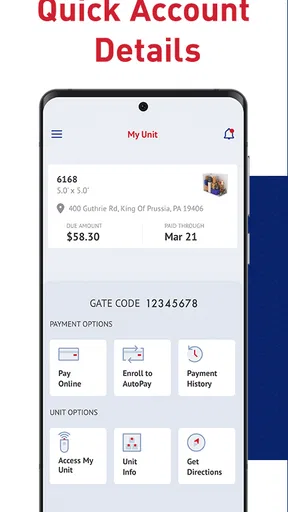
CubeSmart Self Storage is the mobile companion for managing a CubeSmart storage unit and account. After signing in, users can typically review account information, check payment details, make or schedule payments, view facility information, and contact the storage location. Depending on the facility and account setup, the app may also provide access-related tools or directions, although available features can vary by location.
Can I rent a CubeSmart storage unit through the app?
The app may help you find a nearby CubeSmart facility and begin the rental process, but the exact steps depend on the location, unit availability, pricing, and current promotions. Some users may be redirected to CubeSmart’s website or asked to complete additional documents before moving in. Always review the rental agreement, deposit requirements, insurance options, access hours, and cancellation terms before confirming a reservation.
Can I make storage payments using CubeSmart Self Storage?
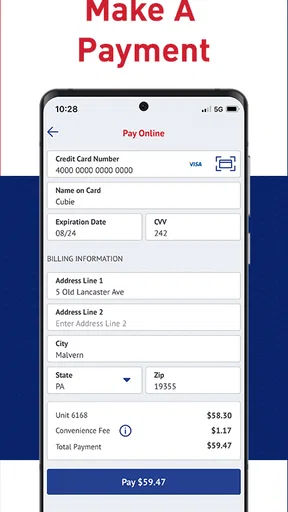
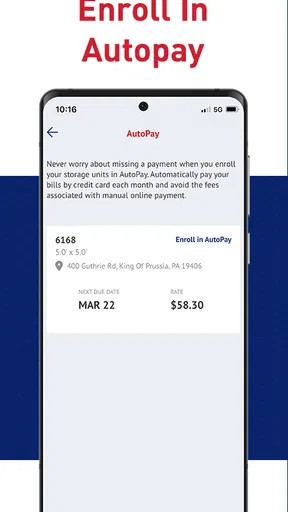
Yes, the app is designed to make account and payment management more convenient for CubeSmart customers. Depending on the version and your account, you may be able to make a one-time payment, manage an automatic payment method, or review billing information. Before submitting payment, verify the unit number, amount due, and saved card or bank details, since processing times and accepted payment methods may vary.
Does the app let me open the storage facility gate or unit?
Access features are not necessarily available at every CubeSmart location. Some facilities may support mobile gate entry or other digital access options, while others continue to use a gate code, keypad, or traditional lock. If mobile access is offered, your phone may need Bluetooth, location services, internet connectivity, and the correct account permissions enabled. Contact the facility if access does not work.
Is CubeSmart Self Storage free to download, and is it safe to use?
CubeSmart Self Storage can generally be downloaded without an upfront app charge, but using a storage unit involves separate rental, administrative, insurance, and other facility-related fees. The app may request personal, payment, and location information to provide account and access services. Download it only from the official Google Play Store or Apple App Store, keep your login private, and review the privacy policy before use.
